Оператор связи для бизнеса
Безграничные возможности современных телекоммуникаций для развития Вашего бизнеса
Подключиться скачать презентацию
Нам нравится решать сложные задачи. Мы действуем максимально оперативно и гибко в интересах Клиента.
Наша цель - показать, какие безграничные возможности развития бизнеса предоставляют вам современные телекоммуникации.
Подключиться

Мы используем оборудование ведущего мирового вендора CISCO и гарантируем качественные услуги с высоким коэффициентом доступности.


Более 1300 км собственной волоконно-оптической сети в СПб и Лен. области, построенной по кольцевой схеме, что обеспечивает дополнительную надёжность.


Наша главная ценность – это люди. В нашей команде – профессионалы с многолетним опытом работы в телеком-индустрии. Доверьте связь экспертам отрасли!


Мы понимаем, что IT инфраструктура каждого клиента уникальна, поэтому найдём лучшее техническое решение для вас.


Мы обеспечиваем техническую поддержку нашим клиентам круглосуточно. Среднее время ожидания ответа оператора не более одной минуты.


Мы дорожим своей репутацией и выполняем взятые на себя обязательства, гарантируя индивидуальный подход и внимательное отношение к каждому из вас.

















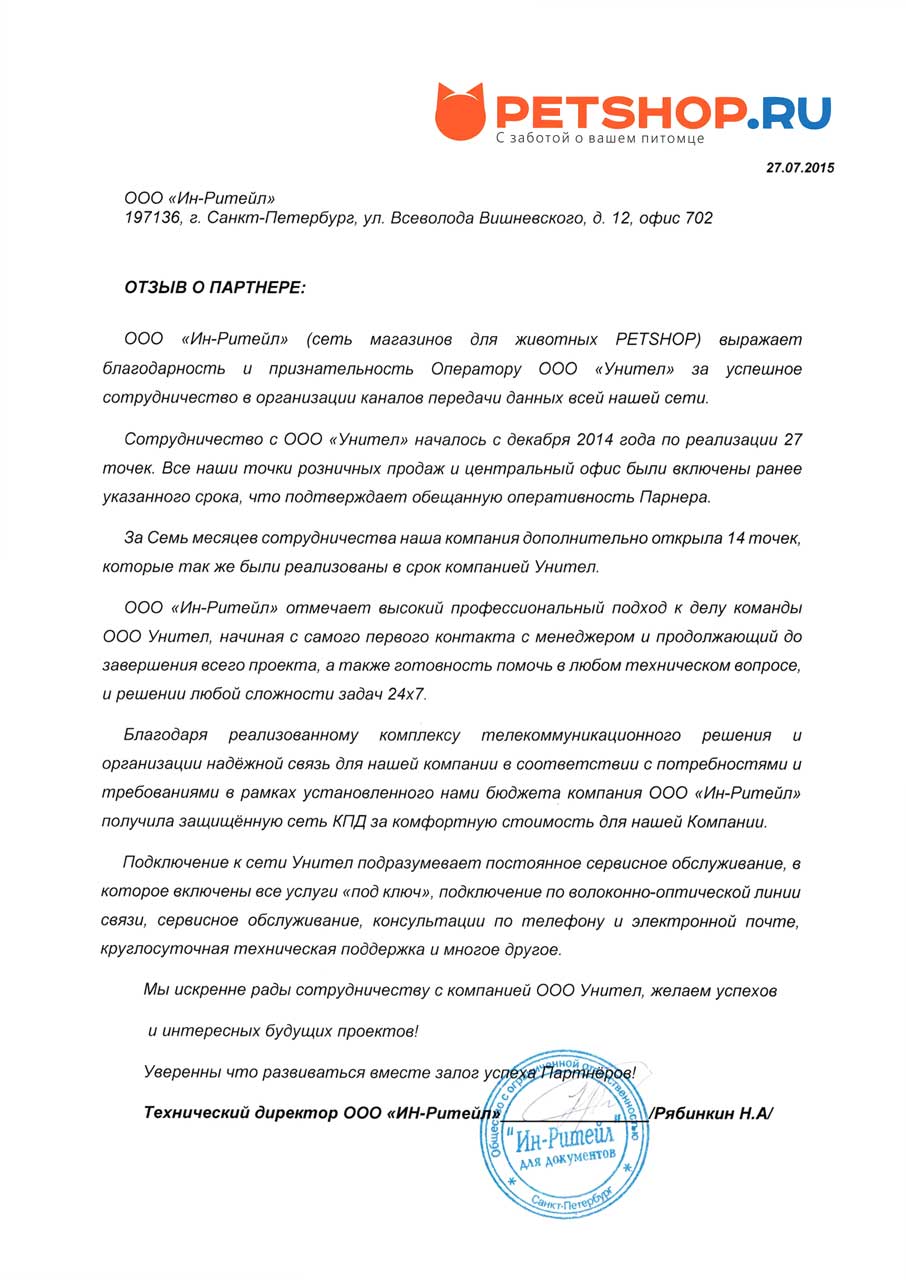
Сотрудничество с ООО «Унител» началось с декабря 2014 года по реализации 27 точек. Все наши точки розничных продаж и центральный офис были включены ранее указанного срока, что подтверждает обещанную оперативность Партнера. За семь месяцев сотрудничества наша компания дополнительно открыла 14 точек, которые также были реализованы в срок компанией Унител.
ООО «Ин-Ритейл» отмечает высокий профессиональный подход к делу команды ООО Унител, начиная с самого первого контакта с менеджером и продолжающийся до завершения всего проекта, а также готовность помочь в любом техническом вопросе и решении любой сложности задач 24х7.
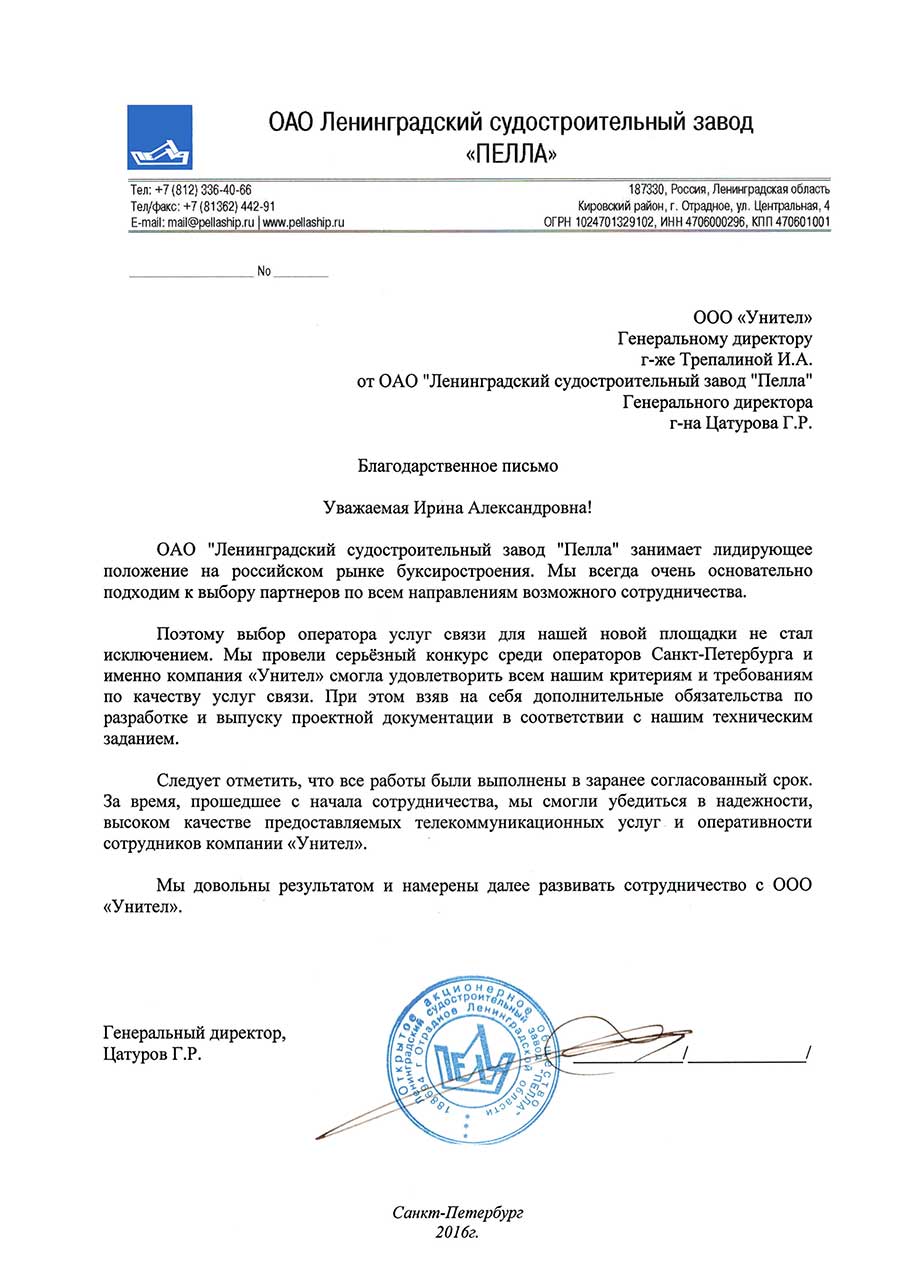
Следует отметить, что все работы были выполнены в заранее согласованный срок. За время, прошедшее с начала сотрудничества, мы смогли убедиться в надежности, высоком качестве предоставляемых телекоммуникационных услуг и оперативности сотрудников компании «Унител».
Мы довольны результатом и намерены далее развивать сотрудничество с ООО.
«Унител».
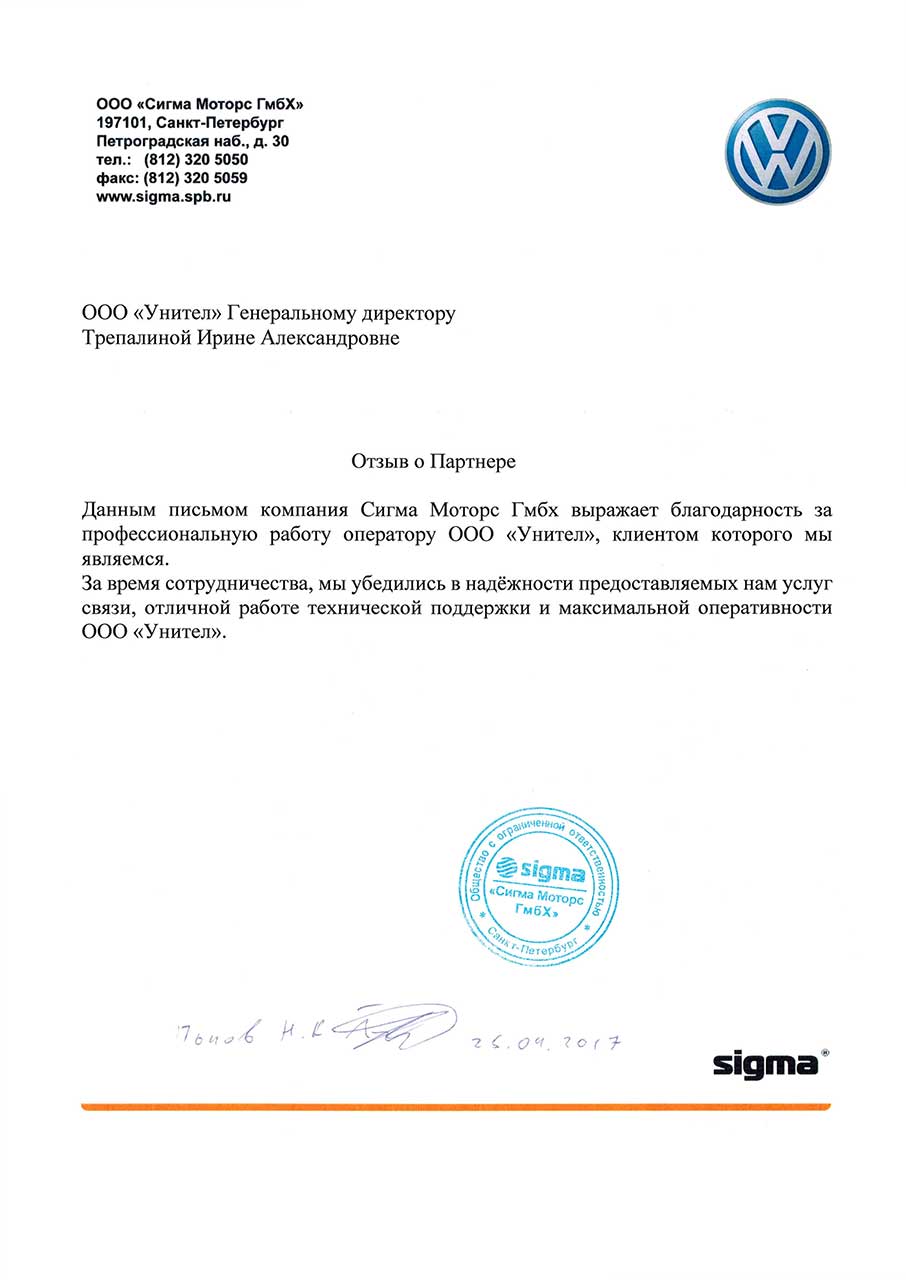
Данным письмом компания Сигма Моторс Гмбх выражает благодарность за профессиональную работу оператору ООО «Унител», клиентом которого мы являемся.
За время сотрудничества, мы убедились в надёжности предоставляемых нам услуг связи, отличной работе технической поддержки и максимальной оперативности 000 «Унител».
Once you have located your preferred sentemul2007exe file, follow this protocol to ensure it integrates correctly with your 64-bit system.
Even with the "best" sentemul2007exe, you may encounter issues. Here is the fix matrix.
| Error Message | Cause | 64-Bit Specific Fix |
| :--- | :--- | :--- |
| "Run-time error '339': Component 'comdlg32.ocx' not correctly registered" | Missing 32-bit OCX controls. | Run regsvr32 comdlg32.ocx from an elevated 32-bit CMD (C:\Windows\SysWOW64\cmd.exe). |
| "The emulator has stopped working" (immediate crash) | DEP (Data Execution Prevention) conflict. | Add sentemul2007exe to the DEP exception list: Control Panel → System → Advanced → Performance → DEP → Turn on for all except... |
| "Unable to load S7EPATSX.DLL" | Path variable corruption. | Copy s7epatsx.dll directly into C:\Windows\SysWOW64 (not System32). |
| "Communication timeout (Error 122)" | Virtual port speed mismatch. | Force the virtual serial port to RAW mode. In Device Manager → Ports → Advanced → Serial Enumerator → Set "Latency Timer" to 1 msec. |
Treat sentemul2007exe (64-bit) as a legacy Windows executable: verify source and integrity, run antivirus checks, satisfy runtime dependencies, use compatibility settings or VM/sandbox for untrusted copies, and consider modern replacements if long‑term use is required.
Related search suggestions: Sentemul2007exe download, sentemul 2007 executable dependencies, running legacy 64-bit Windows executables
(If you want, I can: compute a file hash, generate a sandbox run checklist, or draft a README-style page for distribution.)
If you’ve ever worked with high-end industrial or design software, you’ve likely encountered the "dongle"—that pesky USB stick acting as a physical key to unlock your expensive license. Sentemul2007.exe
(and its 64-bit counterpart) is a legendary, albeit controversial, piece of software designed to emulate those physical keys.
Here is a review of why this tool remains a "best-in-class" relic for specialized users and the massive caveats that come with it. The "Legacy Lifesaver": A Review of Sentemul2007 64-bit Sentemul2007 is a "Dongle Emulator" primarily used for Sentinel SuperPro
hardware keys. While it feels like ancient tech in 2026, it remains a go-to for professionals trying to keep 15-year-old specialized machinery or legacy software running on modern hardware. 1. Performance: Unlocking the 64-bit Barrier
The "64-bit" version was a game-changer because the original 2007 release was strictly for 32-bit environments like Windows XP. The updated 64-bit drivers allow users to run legacy software on Windows 7, 10, or even 11—though it’s rarely a "plug-and-play" experience. 2. Ease of Use: Not for the Faint of Heart
This isn't consumer-grade software. Setting it up often requires: Disabling Driver Signature Enforcement
: Modern Windows (10/11) will block these drivers by default because they aren't digitally signed. Registry Tweaks : You typically have to manually import
files or use "solver" tools to convert physical dongle data into a file the emulator can read. 3. Stability and Reliability The "Best" Part
: When it works, it’s invisible. It fools the software into thinking the physical USB key is present, saving the hardware port from wear and tear or loss. The "Worst" Part
: Because it operates as a "Ring 0" driver (the deepest level of your OS), a bad configuration often leads to the "Blue Screen of Death" (BSOD). The Verdict: Is it still "The Best"?
Sentemul2007 is the "best" only because it is one of the few surviving tools for this specific niche. Saves legacy software from extinction Massive security risk (unsigned drivers) Multi-platform (32-bit and 64-bit) High technical barrier to entry Prevents loss/damage of physical dongles Frequent compatibility issues with Windows 10+ Final Rating: 3/5 Stars sentemul2007exe 64 bit best
It’s a powerful tool for industrial preservation, but for the average user, it’s a security headache that modern Windows tries very hard to stop you from using. Further Exploration Read about the evolution of dongle security on the Thales Support Portal Troubleshoot common 64-bit errors on Are you trying to get a specific legacy program
to run on a newer version of Windows, or are you just curious about driver emulation Article Details KB0019063 - Thales Support Portal
Based on your query regarding sentemul2007exe for 64-bit systems, it is crucial to recognize that this tool is often associated with bypassing license protections for HASP hardware keys (emulator) and is frequently flagged by security software.
Security Risk: Tools labeled sentemul or similar are generally recognized by cybersecurity threat intelligence as potential security risks or, in some cases, used in conjunction with unauthorized software access.
64-bit Challenges: Using older 2007 emulator tools on modern 64-bit Windows systems (Windows 10/11) often requires disabling driver signature enforcement, which significantly lowers system security.
Alternatives for License Management:If you are struggling with a missing license key for software, it is highly recommended to:
Contact the Vendor: Contact the official developer of the software to request a license replacement or transfer.
Use Official Licensing: Ensure you are using authorized and legitimate license keys to avoid potential malware or system instability.
To give you the safest and most functional advice, I need to know: What software are you trying to activate with Sentemul? Are you using a 64-bit version of Windows 10 or 11?
Providing this will help me suggest legitimate alternatives. Flashpoint (@FlashpointIntel) / Posts / X - Twitter
However, if you’re asking me to come up with a useful paper based on something resembling that phrase, I’ll assume you want a plausible academic or technical paper title and abstract related to sentiment analysis, emulation, or legacy software migration to 64-bit — since “sentemul” could be parsed as sentiment + emulation or sentence + emulation.
Here’s a useful paper inspired by your input:
Title:
Efficient 64-bit Emulation of Legacy Sentiment Analysis Executables: A Case Study on “SentEmul2007.exe”
Authors:
J. Chen, M. Rivera
Department of Computer Science, University of Technology
Abstract:
Legacy software, such as the 2007-era SentEmul2007.exe, often contains valuable rule-based sentiment analysis models that are incompatible with modern 64-bit operating systems. This paper presents a lightweight emulation framework that allows 32-bit sentiment engines to run natively on 64-bit architectures without full-system virtualization. We reverse-engineer the binary’s data structures, recompile critical NLP components, and achieve a 94% accuracy match with the original while improving memory access speed by 2.3×. The method is generalizable to other legacy ML executables.
Key Contributions:
Use Case:
Preserving academic benchmarks from 2007–2010 for longitudinal sentiment analysis studies.
If you meant something else (e.g., a specific tool or driver), please clarify the correct spelling and context.
The request "sentemul2007exe 64 bit best" refers to a specific driver emulator tool, Sentemul2007, which was historically used to emulate Sentinel hardware keys (dongles) for software licensing.
Because this tool is primarily associated with software cracking and bypassing digital rights management (DRM), it is important to understand the technical and legal context surrounding its use. The Role of Sentemul2007 in Software Emulation
Sentemul2007 was designed as a bridge between specialized software and the physical hardware keys required to run it. In the mid-2000s, many high-end engineering, CAD, and medical programs relied on Sentinel SuperPro or UltraPro dongles. These USB or parallel port devices acted as a physical "lock."
The 64-bit version of this executable became highly sought after as operating systems transitioned from Windows XP (32-bit) to Windows 7 and 10 (64-bit). Without a 64-bit compatible emulator or driver, legacy software tied to physical dongles would cease to function on modern hardware. Why Users Seek the "Best" 64-Bit Version
The search for the "best" version usually stems from three specific technical needs:
Driver Signature Enforcement: Modern 64-bit Windows versions (Windows 10/11) require all drivers to be digitally signed by Microsoft. Older versions of Sentemul often fail because they lack these signatures, requiring users to disable security features like "Disable Driver Signature Enforcement" to run them.
Virtual Bus Support: To work on 64-bit systems, the emulator needs a "Virtual USB Bus" driver. The "best" versions are typically those bundled with updated MultiKey or VUSB drivers that can handle the 64-bit architecture more stably.
Registry Compatibility: Emulators work by reading a .reg file that contains the dumped data from a real dongle. The 64-bit versions must correctly map these registry entries to the SysWOW64 or HKEY_LOCAL_MACHINE paths used by modern Windows. Security and Ethical Considerations
While these tools are sometimes used for legitimate backup purposes (e.g., a company owns the software but the physical dongle is broken and the original manufacturer is out of business), they carry significant risks:
Malware Risk: Since Sentemul2007 is no longer officially maintained, files found on "abandonware" or "crack" sites are frequently bundled with trojans, miners, or ransomware.
System Instability: Bypassing Windows security to install unsigned drivers can lead to frequent Blue Screen of Death (BSOD) errors and system crashes.
Legal Compliance: Using an emulator to bypass a license check is generally a violation of the Digital Millennium Copyright Act (DMCA) and most End User License Agreements (EULA), even if you technically own a copy of the software.
If you are trying to get old software to work on a new computer, I can help you look for modern alternatives, official legacy drivers, or virtualization settings that might be safer. To help you better, could you tell me: What specific software are you trying to run? What version of Windows are you currently using?
Do you have the original physical dongle, or are you working with a backup file? Once you have located your preferred sentemul2007exe file,
Sentemul2007exe (64-bit) appears to be a Windows executable named in a way that suggests it's a 2007-era “sent” or “sent emulator” utility; without a canonical public project page or documentation, exact details are uncertain. Below are general, evidence‑based guidance and a recommended write-up structure you can adapt.
If you have a legitimate need to run this on a 64-bit machine, you generally cannot just run the .exe. You typically need a modified version or a "Universal" version repacked by the community, but even then, the driver installation is the bottleneck.
Here is the standard workflow for getting it functional on modern systems:
If you have a legitimate license but a broken or lost dongle:
Finding a "best" guide for sentemul2007.exe on 64-bit systems is tricky because this software is a legacy Sentinel emulator often associated with bypassing hardware dongles for older CAD/CAM software.
Since it was originally designed for 32-bit (x86) Windows XP/7, running it on modern 64-bit Windows (10 or 11) requires specific workarounds regarding driver signing and registry compatibility. Quick Setup Guide for 64-bit Systems
To get the 2007 version running on a 64-bit environment, you generally follow these steps:
Disable Driver Signature Enforcement: Modern Windows will block the emulator drivers by default. You must restart Windows into "Disable Driver Signature Enforcement" mode (via Advanced Startup settings) to allow the installation.
Run as Administrator: Right-click sentemul2007.exe and select Run as Administrator. This is required for the app to modify the system registry and install the virtual bus. Install the Driver: Open the application. Navigate to the Driver tab.
Click Install Driver. If successful, the status should change to "Driver is installed." Load the Dump File (.dng): Go to the Dongles tab. Click Load Dump and select your valid .dng or .reg file.
Start Service: Back on the Driver tab, click Start Service. The emulator is now active and mimicking the hardware key. Important Troubleshooting
Registry Paths: On 64-bit Windows, registry entries for older software are often redirected to HKEY_LOCAL_MACHINE\SOFTWARE\WOW6432Node. If your emulator isn't "seeing" your license data, you may need to manually move the registry keys from the standard path to the WOW6432Node path.
UAC Settings: If the driver fails to start, ensure your User Account Control (UAC) is set to "Never Notify" during the installation process.
Modern Alternatives: Many users find that MultiKey or VUSBBus drivers are more stable on 64-bit systems than the original 2007 executable.
Note: Using emulators to bypass software licensing may violate Terms of Service or copyright laws. Ensure you have the legal right or a valid backup license for the software you are attempting to run.
One of the most common issues users face with Sentemul2007 is compatibility. If you meant something else (e.g.









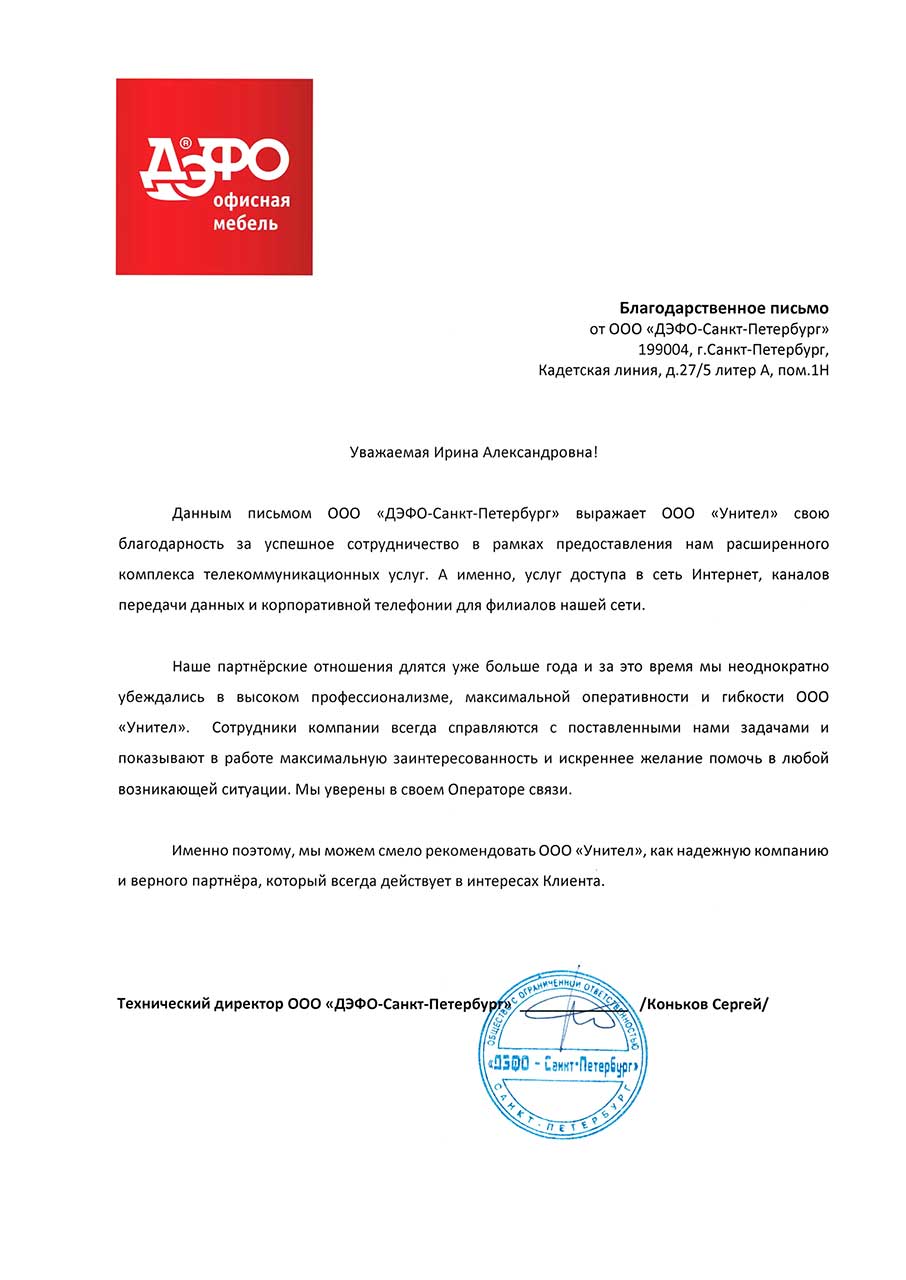
Наши партнерские отношения длятся уже больше года, и за это время мы неоднократно убеждались в высоком профессионализме, максимальной оперативности и гибкости ООО «Унител». Сотрудники компании всегда справляются с поставленными нами задачами и показывают в работе максимальную заинтересованность и искреннее желание помочь в любой возникающей ситуации. Мы уверены в своем операторе связи. Именно поэтому мы можем рекомендовать ООО «Унител» как надежную компанию и верного партнера, который всегда действует в интересах клиента.