Create a ”personalized sketch doll” and make it pose!
DesignDoll is a software program that can freely manipulate human body models in 3D space.
You can create postures and compositions that artists demand, with easy, intuitive operations.
Download
DesignDoll Ver6.1 was released! Read about the newly added features below
FeaturesDesignDoll is a software program that can freely manipulate human body models in 3D space.
You can create postures and compositions that artists demand, with easy, intuitive operations.
Download
With DesignDoll, you can create a human model pose collection and export 3D models to our pose-sharing website “Doll-Atelier.”
Windows® 11
Windows® 10
Windows® 8
Windows® 7
Most of the built-in functions are based on requests from our customers

DesignDoll uses a blending method, where forms and sizes of various parts to be changed freely, allowing models to be reproduced with head to body ratios that intuitively suit the drawing

With various perspective functions, deformations resembling hand drawings or emphatic expressions that cannot be represented with other 3D software are possible. Along with parallel projection, false perspectives, real perspectives and lens perspectives, functions such as eye level displays and change of camera perspective (viewing angle) are also available

A dedicated controller for moving fingers minutely has been made available. By creating the rough shape in simple mode, then moving on to detailed mode, hand shapes can be created quickly

DesignDoll can set multiple body models within the same scene, allowing complex compositions in which sketches tend go askew to be drawn easily. By observing from every angle, the breadth of possible expressions is increased

Data you create can be used repeatedly, reducing creation time, by simply dragging pose and body shape icons onto new models.

In pursuit of pose creation speed, DesignDoll is designed to manage postures with minimal controllers. Minute adjustments can even be made by directly dragging points on the 3D models.

With its bone adherence function, DesignDoll can link items created with external software to specific parts. No need to go through bothersome processes such as fitting a sword to a hand after deciding on a posture

DesignDoll can create in-between faces and body shapes, by synthesizing the difference between two existing models into one new model. By repeatedly synthesizing, growth process of a character can be created easily

Used together with the pose and model sharing website “Doll-Atelier,”DesignDoll users can share designs to be used freely for anything, commercial or non-commercial

DesignDoll can apply pre-set or customized effects with a single click. By setting-up effects that suit you, you can focus more attention on the relationship between your models and their environment

By creating box shaped items along grids, DesignDoll eliminates the bothersome task of drawing perspective lines

Painting directly onto 3D models has now become possible. By drawing auxiliary lines such as the location of eyes or hairlines onto each character, you can create personalized sketch dolls, in a manner which is difficult with actual sketch dolls

With DesignDoll, you can freely set light sources to create your envisioned image. Since this fosters greater comprehension of three-dimensional objects, it is an optimal tool for illustration practice as well

By clicking on a pose or a hand icon, library data can easily be applied to a pose being created. Stock your favorite data – and the trouble of searching for or recreating 3D models can be eliminated, enabling the quick creation of high quality drafts

DesignDoll can export, import, and synthesize 2D data, and export 3D data to other 3D software programs
With DesignDoll, you can create a human model pose collection and export 3D models to our pose-sharing website “ Doll-Atelier .”

With the new Clay Tag, you can change the very shape of model parts.
Tag detail adjustments allow you to fine-tune your changes.
You can even make asymmetrical changes to the models.
We’ve added a new memo tag.
Add notes on any model to help manage your object list.
Memos are displayed in the top folder.
Selecting the memo will automatically bring up the model with the memo tag.


You asked for it, so we added a folder function.
We’ve adjusted the UI to improve usability.
Tag lists automatically wrap as you adjust the menu zoom, keeping them visible.
A "high quality" service is an available service. Downtime or frequent buffering directly contradicts the keyword’s intent. Top-tier platforms guarantee 99.9% uptime.
Even when seeking "i mexzoolivemx high quality," users encounter problems. Here is how to fix the most frequent complaints:
| Problem | Likely Cause | Solution | | :--- | :--- | :--- | | Constant Buffering | Insufficient bandwidth or network congestion | Lower the stream resolution temporarily; close background apps. | | Blurry Video | Adaptive bitrate scaling kicking in too aggressively | Manually select the highest resolution in the player settings. | | Audio out of sync | Device driver or browser cache issues | Clear cache or restart the application/device. | | Error code 404/503 | Server-side issue | Wait 2–3 minutes and refresh; check official social channels for outages. |
The market is full of cheap streamers that promise "HD" but deliver frustration. The iMEXZooliveMX is for the discerning user. It is an investment in your leisure time—ensuring that every second of your entertainment looks exactly as the director intended: High Quality, no excuses.
Ready to upgrade your view? Check the official specifications and availability at your local iMEXZooliveMX retailer.
Disclaimer: This content is a creative sample based on the product name provided. Always refer to official product documentation for technical specifications.
Based on current market data and site analysis, Mexzoolivemx
is a relatively obscure online retailer, and there is a significant lack of verified customer feedback to confirm its "high quality" claims. i mexzoolivemx high quality
Before purchasing, consider these key findings regarding the brand's quality and reliability: Review Summary Quality Transparency
: There are very few independent, third-party reviews (such as on Trustpilot or Sitejabber) to verify the material quality or durability of their products. Digital Footprint
: The brand has a low social media presence and limited search engine visibility, which is often a "yellow flag" for online shoppers seeking established quality. Website Content
: Some product descriptions and site messaging appear to be generic or auto-generated, which can sometimes indicate a dropshipping model where quality control varies significantly between items. Key Considerations Before Buying Verify the Source
: Check for clear "About Us" and "Contact" information. High-quality brands typically provide a physical business address and a clear customer service phone number. Return Policy
: Review their return and refund policy carefully. "High quality" claims are only as good as the company's willingness to stand behind them if the product arrives damaged or not as described. Secure Payment
: Always use a protected payment method (like PayPal or a credit card with fraud protection) when dealing with newer or less-reviewed sites like Mexzoolivemx. A "high quality" service is an available service
Since MexzooLiveMX appears to be a niche or emerging name, I’ve put together a few options for your "high quality" branding text, depending on what vibe you're going for. Option 1: Professional & Modern (Best for a website or bio)
MexzooLiveMX: Elevating the Standard.We are dedicated to delivering high-quality experiences that blend innovation with reliability. Whether you're here for [Service/Product A] or [Service/Product B], MexzooLiveMX ensures every detail is handled with excellence. Experience the difference where quality isn't just a promise—it's our baseline. Option 2: Bold & Punchy (Best for social media or ads)
High Quality. No Compromises. MexzooLiveMX.Why settle for average when you can have the best? MexzooLiveMX brings you premium quality and unmatched reliability. Upgrade your expectations and join the community that values the finer details. Option 3: Short & Minimalist (Best for a tagline) MexzooLiveMX | High Quality, Live. Option 4: "About Us" Style (Warm and inviting)
At MexzooLiveMX, our mission is simple: to provide high-quality solutions that empower our community. We believe in transparency, craftsmanship, and the drive to be better every single day. From our hands to yours, we bring nothing but the best.
Could you tell me a bit more about what MexzooLiveMX actually does? I can help you sharpen the text even more if I know if it’s a clothing brand, a tech service, or something else!
Here’s an interesting, slightly playful review for “I Mexzoolivemx High Quality” (assuming it’s a product like a streaming device, HDMI cable, or AV accessory — since the name suggests “I mix / I live MX” with a focus on quality):
Title: “This name is a typo waiting to happen, but the performance is no accident.” Disclaimer: This content is a creative sample based
Rating: ⭐⭐⭐⭐☆ (4.5/5)
Let’s be real: when I first saw “I Mexzoolivemx High Quality,” I thought my cat walked across my keyboard. But curiosity got the better of me, and I hit “buy.” Turns out, this little underdog delivers where it counts.
The good:
The weird:
Verdict: If you can get past the bizarre branding and lack of hand-holding, this is a sleeper hit. Works better than some big-name brands costing twice as much. Just don’t try to say the name out loud after two drinks.
Would I buy again? Yes — and I’d whisper the name so no one hears me.
Forget manual settings. The iMEXZooliveMX analyzes your network environment in milliseconds. It automatically scales between 5 Mbps and 100+ Mbps without interrupting your viewing experience. If your connection dips, you won't see a spinning wheel—you'll see a seamless, temporary resolution adjustment that snaps back instantly.
Use of unauthorized IPTV services may violate copyright laws in your country. This guide is for educational purposes only. Ensure you have a stable internet connection (at least 10Mbps for HD) to maintain "high quality."

The Scale Tag’s new Simple Adjustment Mode lets you make rough adjustments to model bodies.
Controllers are split between the left and right sides of the body, for adjusting length (buttons) and thickness (rings).
Adjust the length and thickness of parts by dragging.
Intuitively make body type adjustments, even after posing.
The current Scale Tag will become the Detail Adjustment Mode, and has an easier user interface.
Perfect your body type in Detail Adjustment Mode, after making rough changes in Simple Adjustment Mode.
Click on specific bones to make individualized detail adjustments.
Drag the rings to adjust bone thickness on both axis, or drag one of the balls to adjust the thickness of each axis independently.
Expand or shrink the whole bone by dragging the ball in the middle of the bone.


Now you can adjust the thickness of each bone’s base and tip.
Change bone balance and make them narrow or widen how you like.
This feature is found in the Scale Tag’s Detail Adjustment Mode.
Bone thickness can be adjusted from base to tip by dragging the ring controllers.
When the thickness of a bone’s base and tip are different, you can now adjust the feel of the transition with a Bezier graph.
With this, you can make transitions sudden or gentle.
A profile of the transition is displayed above the graph.


The length and thickness of fingers can now be adjusted.
Perfectly match your model’s hands to their height.
Quickly & intuitively customize fingers with sliders.
Test-out variations to find the perfect combination of adjustments.
These features were included in the Scale Tag, instead of the Hand Tag, to ensure that adjustments are included in Mix Model combinations.
When using viewing angle adjustments for impact, your degree of freedom within the composition is limited, and the results often don’t feel right. By using DesignDoll’s “false perspective function”, you can easily and freely make perspective distortions to attain a natural fit for your artistic vision
Specific parts can be emphasized
Because the false perspective function uses camera manipulations, there is no need to re-edit the head to body ratio of the model or the pose
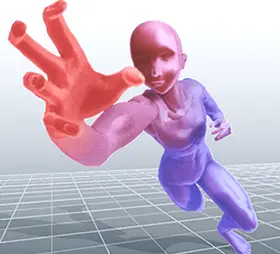


The camera perspective functions of DesignDoll are ideal for creating “compositions with a natural, hand-drawn feel” instead of the computer-generated feel of other 3D programs. We know you’ll enjoy this convenient function that brings your compositions closer to the images seen by the naked eye, while maintaining the integrity of your illustrative vision.
Real perspectives that can adjust to natural curves
Lens perspectives that can reproduce wide-angle and fish-eye lens effects
Eye level or camera height display functions
You can download any poses and models uploaded onto the user website “Doll-Atelier”
Models & PosesImport your favorite poses from the website with a single click
Significantly reduce model creation time by synthesizing pre-set data and creating elements from it
Imported poses can be used freely, for commercial or non-commercial applications


By popular demand, we’ve improved the flat image export feature.
Using 3D resolution, you can now print flat images not limited to the size of your monitor.
New image export user interface.
New background feature (White, Black, transparent).
Export image model type (Simple, Box, Bone), shadow and ground are now adjustable.
Fit Image Within Output Dimensions option ensures no cut off edges.
Now your models can be naturally posed with double-jointed elbows.
Just pull the hand controller past the arm’s full extension for a double-jointed bend.
The reverse bend direction and angle limit can be set in preferences.
This feature can be turned off & on in the Property window.


To address a variety of needs, we’ve improved the height adjustment feature.
Change model heights as a relative percentage of current height.
The model’s current height will now be displayed, when opening the feature.
Improved calculations added for more accurate heights.
Height units chosen in the preferences menu now apply throughout the program.
Height adjustments no longer mess up your model’s ground contact.
You can now choose colors for each model individually.
In the Visibility Window, you can pick the model’s overall color & transparency, the visibility of certain parts, and even choose different colors for various aspects of each model.
Objects now have individual preferences too.
Models with no individual coloration will be controlled by the Effect Window settings.


Multiple controllers can be selected by double-clicking.
Double-click the hip controller to select all of the upper body controllers at once.
Double-click one of the foot controllers to select both foot controllers and chest at once.
This feature can be turned off & on in the Preferences menu.
Choose the color of imported models.
Set the color of each imported object using the Import Tag.
Choose if imported objects are affected by lighting or not.
Imported objects without a selected color will follow settings in the Preferences Menu.


We improved the twd file directory window operability.
User Interface layout change button added.
Directory level up button added.
Previous folder & next folder arrow visibility improved.
The outline of the main editing window now blinks, when tags from Library Mode are applied.
Icon sizes now retain their previous sizes.
We’ve added the left-right mirroring feature typically found in 2D software.
This is useful for checking the balance of poses.
While pressing the M key, a mirror image of your composition will be displayed.
A mirrored image will also be displayed in the Camera View.


Easily change data values with your mouse.
User interfaces automatically change to fit window sizes.
Selections and values can be adjusted by clicking and dragging.
Values can be changed with the mouse wheel as well.
Lock in changes with a click of your mouse, anywhere outside the yellow box.
You can also adjust values by clicking arrows with the cursor.
Position Tag was fixed for improved functionality.
Snap to Middle option automatically snaps the position controller to the center of models.
New controller shape makes it easier to click from various angles.
The upper part of the controller now adjusts to the height of the model.


We added guide lines, that show while controllers are being dragged, to better illustrate the relative changes being made.
You can turn this feature on & off in the Preferences Menu.
New pose controller icon.
We’ve changed our icons, to make them more intuitive.
The Settings icon is split into the Simple Adjustment & Detail Adjustment icons.
We changed the look of icons throughout the program, to make them more attractive.


There’s a new default body design for new compositions.
The default model’s pose is also changed slightly.
You can choose to use the old default model in the Preferences Menu.